
What's new in the latest app update:
- One Create tab for your scripts, local script generation, recording, and My Recordings.
- Local scripts on your phone for KCM Elite members.
- A bigger teleprompter with on-screen font and speed controls.
- More reliable saving and sharing, even on a cellular connection.
- Getting Around the App
- Find Your Script in the Create Tab
- Generate a Local Script (KCM Elite)
- Record Your Video
- Save and Share Your Recording
- Frequently Asked Questions
Getting Around the App
The menu at the bottom of the app has three tabs: Library, Create, and Settings.
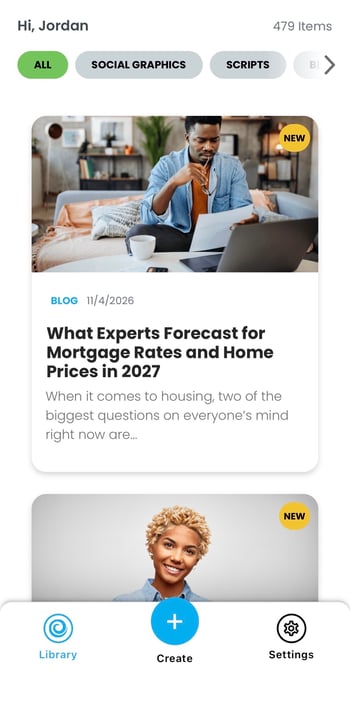
- Library is where you'll find all of your KCM content. Tap the filter chips at the top (All, Social Graphics, Scripts, Blogs, and Videos) to narrow what you see.
- Create is home base for RealTalk. Your scripts, local script generator, recording studio, and saved recordings all start here.
- Settings is where you manage your app preferences. You'll also find Help & FAQ here.
Please note: the Videos chip in the Library shows KCM Pro videos. Your own RealTalk recordings live in Create › My Recordings.
Find Your Script in the Create Tab
Tap Create in the bottom menu. You'll see three tabs at the top, organized the same way as RealTalk in your browser Member Area:
- Local: scripts with local market data for your area (KCM Elite).
- National: KCM's national market scripts, plus any you've edited or written yourself.
- My Recordings: every video you've saved.
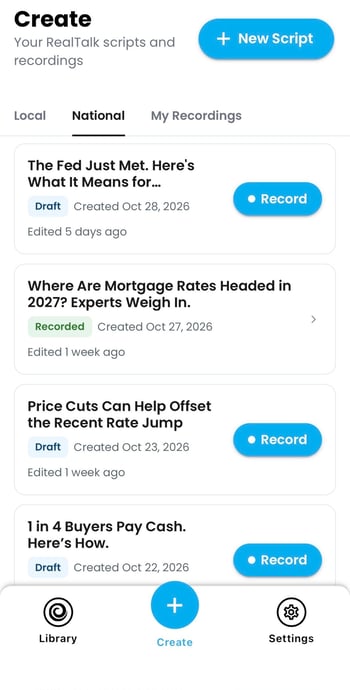
Each script shows its status:
- Draft scripts haven't been recorded yet. Tap the Record button on the card to go straight to the recording screen.
- Recorded scripts already have a saved video. Tap the card to open it.
Want to start fresh? Tap + New Script at the top of the screen.
Generate a Local Script (KCM Elite)
KCM Elite members can now create scripts with live local market data right from their phone.
- In the Create tab, tap + New Script.
- Under Market Topic, tap Select and choose a topic, like Active Listings.
- Under Local Market, tap Change to pick one of your saved markets or search by city or ZIP code.
- Under Audience, choose Seller or Buyer.
- Tap Generate Local Script.
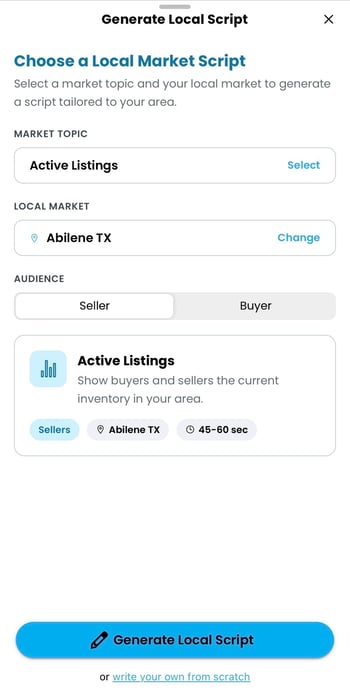
Your finished script opens so you can review and edit it, with Record ready when you are. You'll also find it later in Create › Local.
Prefer to write your own? Tap write your own from scratch at the bottom of the drawer.
Please note: renaming, deleting, or setting a default market is done in RealTalk in your browser Member Area.
Always review AI-generated copy for accuracy and bias before recording.
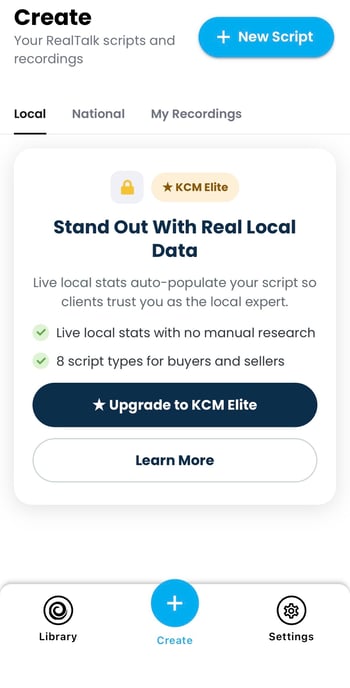
Not a KCM Elite member?
Local scripts are a KCM Elite feature. If you're a Social Edge member, you'll see an upgrade card in Create › Local and under the Scripts chip in the Library. Tap Upgrade to KCM Elite to see your options, or Learn More for details.
Record Your Video
Tap Record on any script to open the recording screen. Your camera fills the screen, with a large teleprompter at the top.
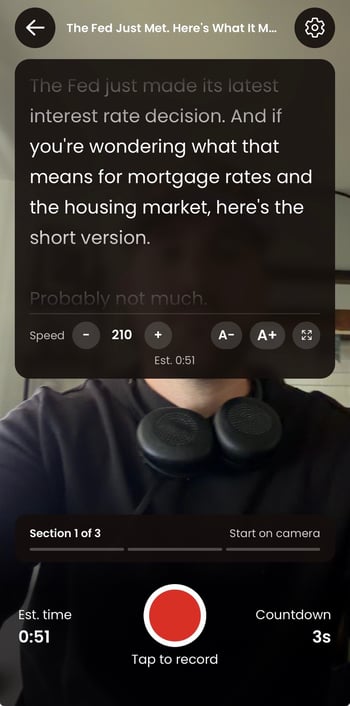
Before or during your recording, you can adjust:
- Speed: tap – or + to slow down or speed up the teleprompter. This works while you're recording, too.
- Font size: tap A– or A+ to make the text smaller or larger.
- Full screen: tap the expand icon to enlarge the teleprompter.
At the bottom of the screen, you'll see your estimated recording time and the section of the script you're on.
When you're ready, tap the red record button. A 3-second countdown gives you time to get set before recording begins.
Review Your Take
When you finish, you'll see a preview of your video. Tap play to watch it, then choose:
- Use This Take to save the video to My Recordings.
- Retake to record the full script again.
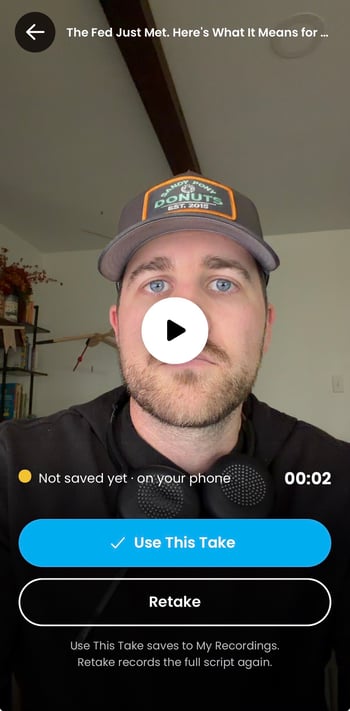
Tip: there's no need to name your video. It's automatically titled after your script.
Save and Share Your Recording
After you tap Use This Take, your video saves to Create › My Recordings, where you can come back to it any time. It also appears on the RealTalk page in your browser Member Area.
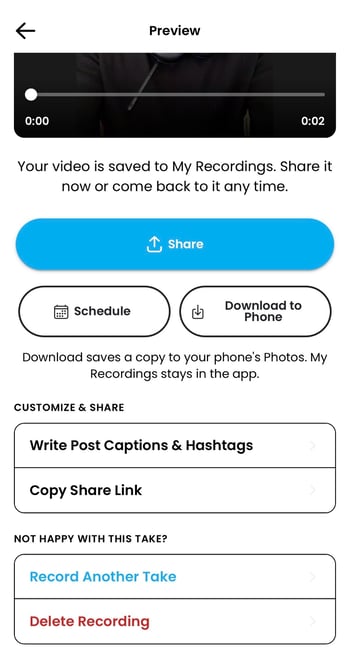
From the Preview screen, you can:
- Share: opens your phone's sharing options right away so you can post to any app on your device. Your video keeps saving to My Recordings in the background.
- Schedule: plan your post for later.
- Download to Phone: saves a copy to your phone's Photos. This works even without an internet connection. Your video also stays in My Recordings in the app.
- Write Post Captions & Hashtags: creates an AI-generated caption you can copy and paste into your social media post.
- Copy Share Link: copies a link to your video.
- Record Another Take or Delete Recording if you're not happy with this one.
Tip: shared video files are named after your script title, so they're easy to find.
Saving on a Weak Connection
Videos now upload in small pieces and retry automatically, so a brief drop in signal won't stop your save. Still, a very weak connection can cause a save to fail.
- If you're offline, you'll see a banner letting you know.
- If you try to leave before your video finishes saving, the app will warn you first.
- If a save fails, your video stays on screen. Tap Try Again, or save it to your phone's Photos so you don't lose it.
Frequently Asked Questions
Where did the Scripts button go?
Scripts now live in the Create tab, under Local and National.
Where did Help go?
Tap Settings, then Help & FAQ.
Where are my recordings?
In Create › My Recordings. The Videos chip in the Library shows KCM Pro videos, not your own recordings.
My video didn't save. Is it lost?
No. If a save fails, your video stays on screen. Tap Try Again when you have a better connection, or save a copy to your phone's Photos.
Why can't I see local scripts?
Local scripts are a KCM Elite feature. Social Edge members will see an option to upgrade in Create › Local.
Can I manage my markets in the app?
You can choose a saved market or search by city or ZIP. To rename, delete, or set a default market, use RealTalk in your browser Member Area.
I don't see any of these changes.
The update is rolling out gradually over about a week. Check your phone's app store to make sure your KCM app is up to date.
Questions? Reach out to your KCM Support team — we're here to help!