
The Constant Contact integration allows KCM members to easily turn KCM content into email campaigns using Constant Contact. This integration is designed for members who want to manage audience selection, scheduling, and delivery inside Constant Contact while using KCM for messaging, structure, and content.
With this integration enabled, KCM can push content emails directly into your Constant Contact account as campaign drafts.
Don't have Constant Contact yet? Bundle with KCM and save!
Requirements
How the Integration Works
How to Enable the Integration
How to Bundle KCM + Constant Contact
Creating and Sending an Email with Email Builder and Constant Contact
Using Constant Contact with KCM Playbooks
Using Constant Contact to Share a RealTalk Video
Using Constant Contact to Share a Blog Post
What the Integration Does
What the Integration Does Not Do
Feedback and Future Enhancements
Requirements
To use this integration, you must:
-
Have an active KCM membership at either Expert or Elite tier
-
Have an active Constant Contact account
-
Be able to log in to Constant Contact during setup to authorize access
How the Integration Works
1. You connect your Constant Contact account to KCM.
2. You create an email template using the KCM Email Builder or select a Playbook email.
3. KCM pushes that email into Constant Contact as a draft campaign.
4. You finalize, schedule, and send the email from Constant Contact.
This workflow allows you to use KCM content without copy-and-paste while keeping full control inside Constant Contact.
How to Enable the Integration
1. Log in to your KCM account.
2. Navigate to My Account and then Integrations.
3. Choose Activate within the Constant Contact tile. (Contact support if you don’t see this)
4. Log in using your Constant Contact credentials when prompted.
5. Approve access so KCM can create campaign drafts.
Once connected, the integration is active immediately.
How to Bundle KCM + Constant Contact
-
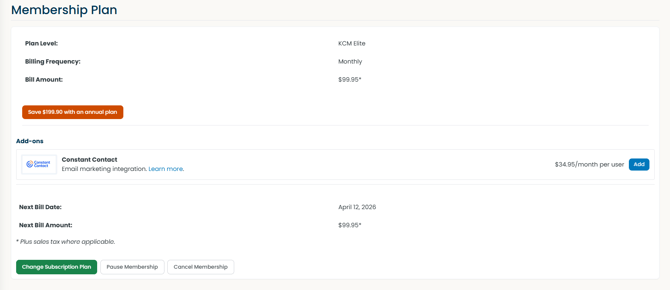
For Expert or Elite Members - My Account > Account Settings > Subscription > Add-ons > Constant Contact
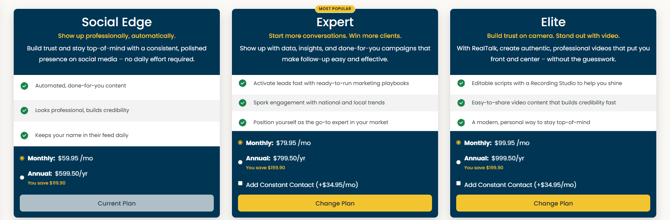
- For Social Edge Members - My Account > Account Settings > Subscription > Change Subscription Plan > Select Add Constant Contact > Click Change Plan
Creating and Sending an Email with Email Builder and Constant Contact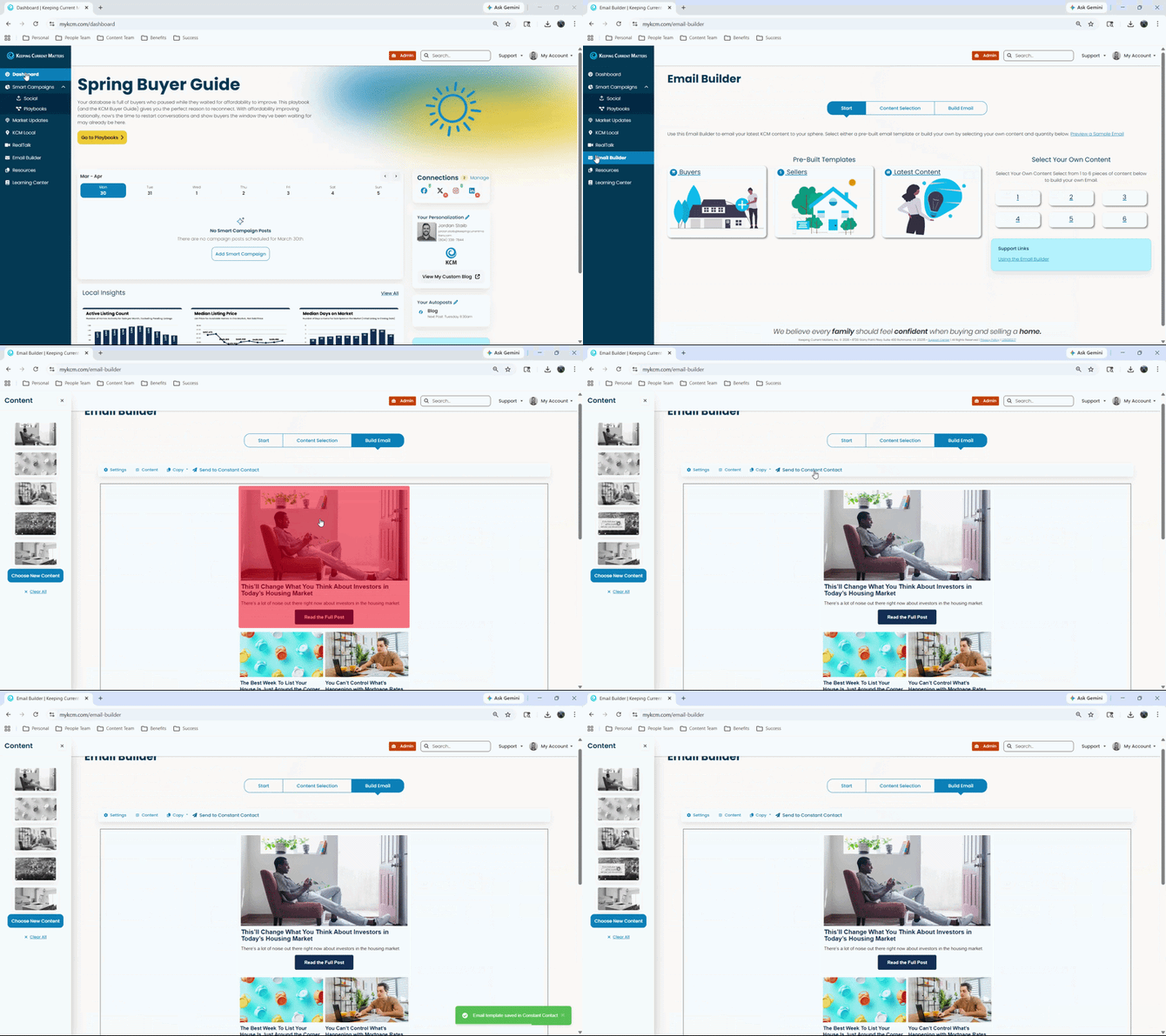
1. In KCM, open the Email Builder.
2. Choose the content type or audience focus (buyer, seller, latest content, etc.).
3. And/or select the KCM article or content you want to use.
4. When you have the email ready, select Send to Constant Contact.
5. This email template will be created in Constant Contact as a draft Campaign.
The email will appear in your Constant Contact account as a draft campaign where you can:
-
Preview the email
-
Edit content or HTML
-
Select your list or segment
-
Schedule or send
Using Constant Contact with KCM Playbooks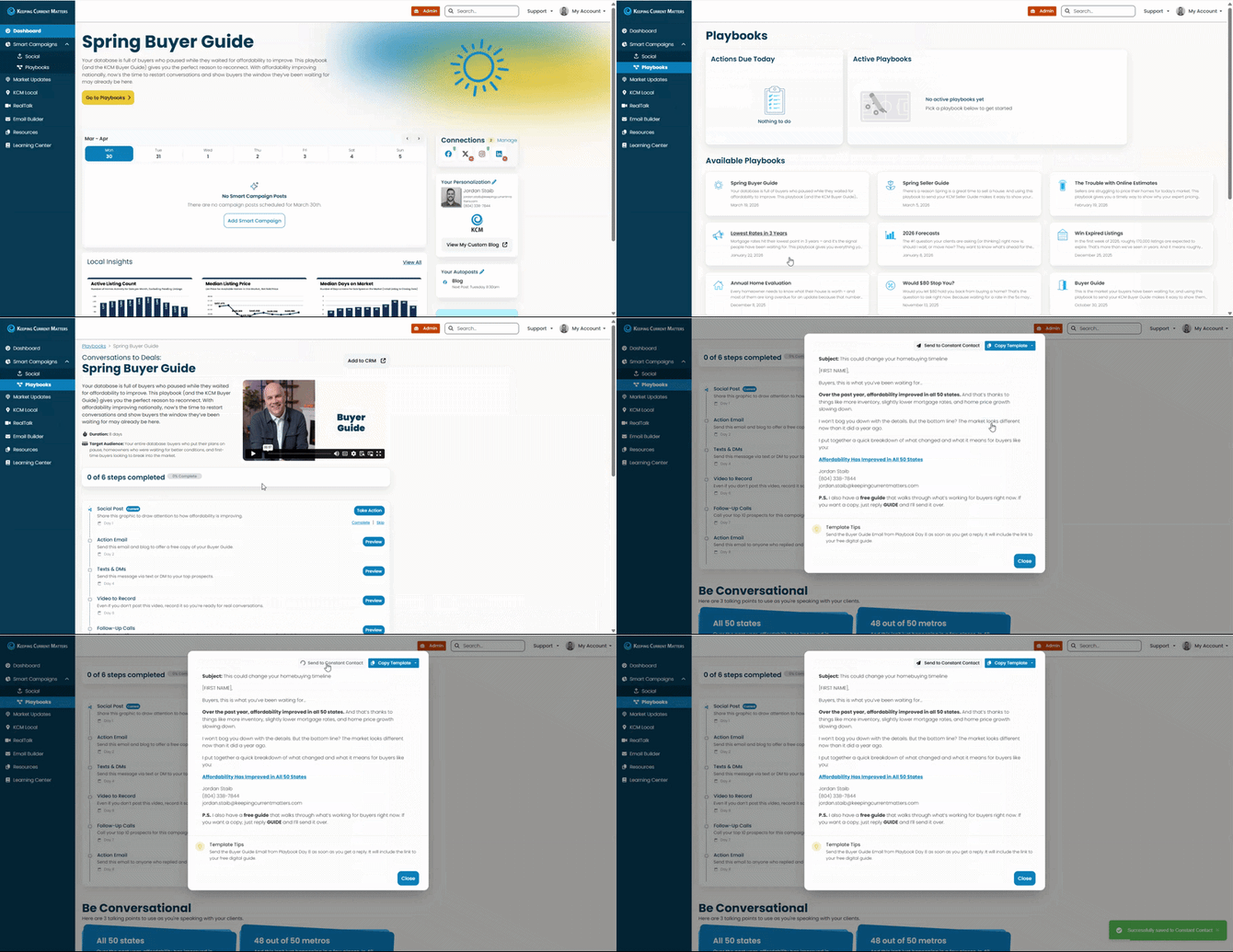
KCM Playbooks provide step-by-step marketing sequences. When a Playbook includes an email step:
-
Click on Preview to review the email
-
Send the template into Constant Contact by choosing Copy to and select Constant Contact
-
Send or schedule the email from Constant Contact
-
Return to KCM to continue the Playbook
This allows you to follow KCM’s messaging and structure while using Constant Contact for execution.
Using Constant Contact to Share a RealTalk Video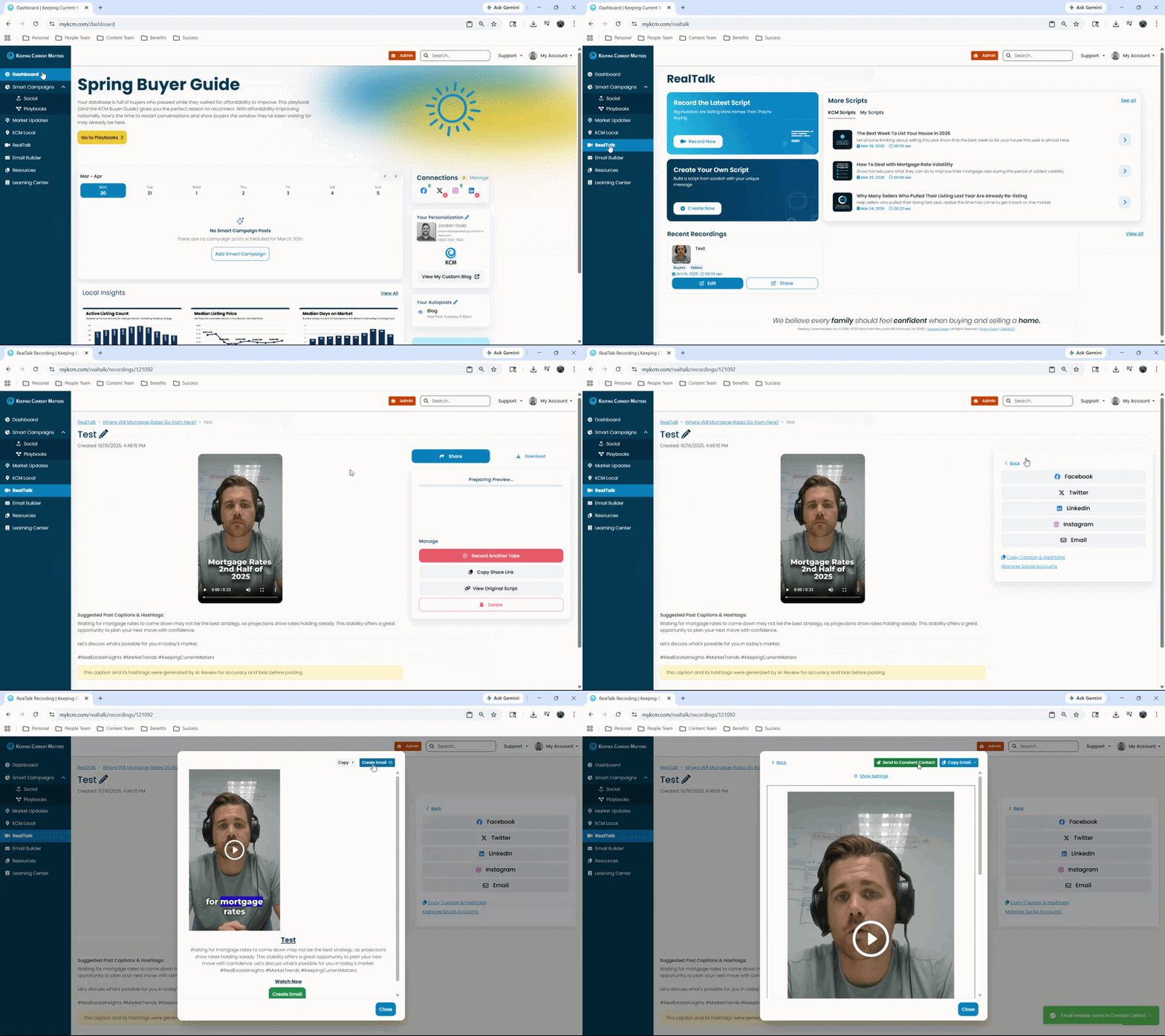
1. In KCM, go to RealTalk.
2. Go to Recent Recordings and select the video you want to share.
3. Click the Share button.
4. Select the Email option.
6. Click Create Email, then click Send to Constant Contact.
The email will appear in your Constant Contact account as a draft, where you can:
-
Preview the email
-
Edit content or HTML
-
Select your list or segment
-
Schedule or send
Using Constant Contact to Share a Blog Post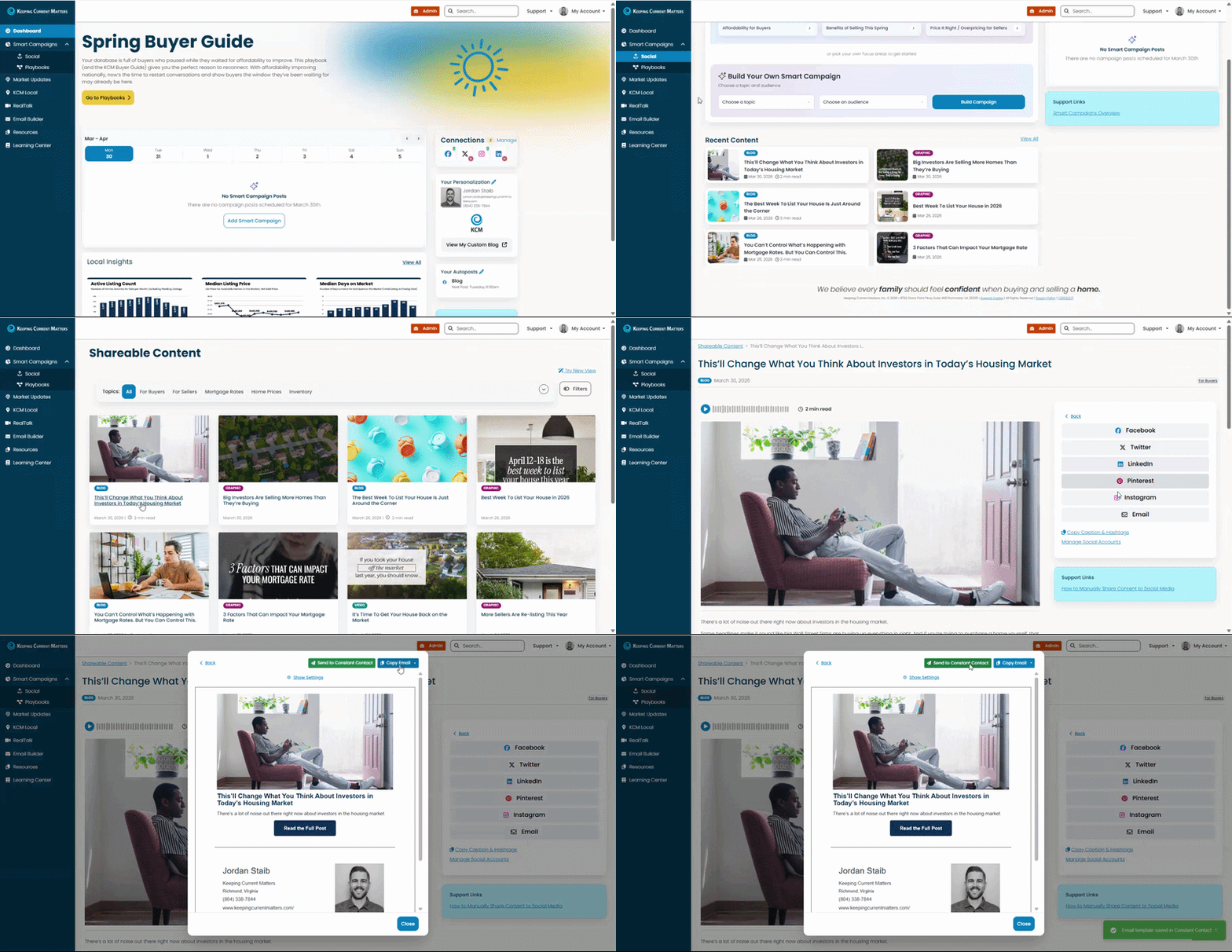
1. In KCM, go to Smart Campaigns > Social.
2. Scroll down to Recent Content and click View All.
3. Select the KCM blog article you want to share.
4. Click the Share button.
5. Select the Email option.
6. Click Create Email, then click Send to Constant Contact.
The email will appear in your Constant Contact account as a draft, where you can:
-
Preview the email
-
Edit content or HTML
-
Select your list or segment
-
Schedule or send
What the Integration Does
The KCM + Constant Contact integration allows you to:
-
Authenticate your Constant Contact account inside KCM
-
Create email templates using KCM’s Email Builder or utilize KCM Playbook emails
-
Push those emails directly into Constant Contact
-
Send, schedule, and manage campaigns entirely from Constant Contact
- Email a RealTalk video, an animated video, or an individual blog post
KCM does not send emails on your behalf. All sending and list management happens inside Constant Contact.
Back To Top
What the Integration Does Not Do
-
It does not automatically send emails, Constant Contact sends the emails
-
It does not sync contacts or lists between platforms
-
It does not create full multi-step campaigns automatically
-
It does not track opens or clicks inside KCM (future)
Constant Contact remains the system of record for email delivery and performance.
Feedback and Future Enhancements
This integration is actively evolving. Future improvements may include:
-
Email performance metrics on your KCM dashboard
-
Ability to embed KCM content inside Constant Contact templates automatically
If you experience friction or have feedback, share it with the KCM team so it can be incorporated into future updates.